8 Example Project Plan Formats: How Each Organizes Work
Compare 8 example project plan formats, from Gantt charts to Kanban boards and PRINCE2, with owners, timelines, tasks, and when each fits best.
Monday morning, a client rebrand kicks off. The sales lead wants a launch date she can put in the proposal. The design director wants the deliverable list with revision rounds attached. The developer wants to know whether the build runs in two-week cycles. Three reasonable answers, three separate files.
By week three the proposal says launch on the 14th, the board says the 21st, and something nobody scoped is sitting in review waiting on a client comment. The team isn't careless. The work was planned in one format and executed against another.
Every plan format is strong on some of the five things a plan has to hold: goals, deliverables, timelines, owners, and tasks. A Gantt chart nails timelines and says almost nothing about ownership. A one-pager carries goals beautifully and collapses on sequencing. Judge each format by those five elements and the choice stops being about taste.
The stakes are real. The U.S. Bureau of Labor Statistics counted about 1.094 million project management specialists in 2025 and projects roughly 1.167 million by 2035, a projected increase of 6.7%, so plenty of people are being handed plans they didn't build.
Eight formats follow, each one judged by what it organizes well, where it breaks, and how to keep it current once the kickoff buzz wears off.
1. Gantt Chart Project Plan
A Gantt chart draws each task as a horizontal bar against a calendar, so overlaps, sequence, and slip become visible without a meeting. It's the default for schedule-driven work: a construction sequence where trades follow one another, a campaign with design, review, and launch phases, a release that lines up development, testing, and deployment.
Planned versus actual, side by side.
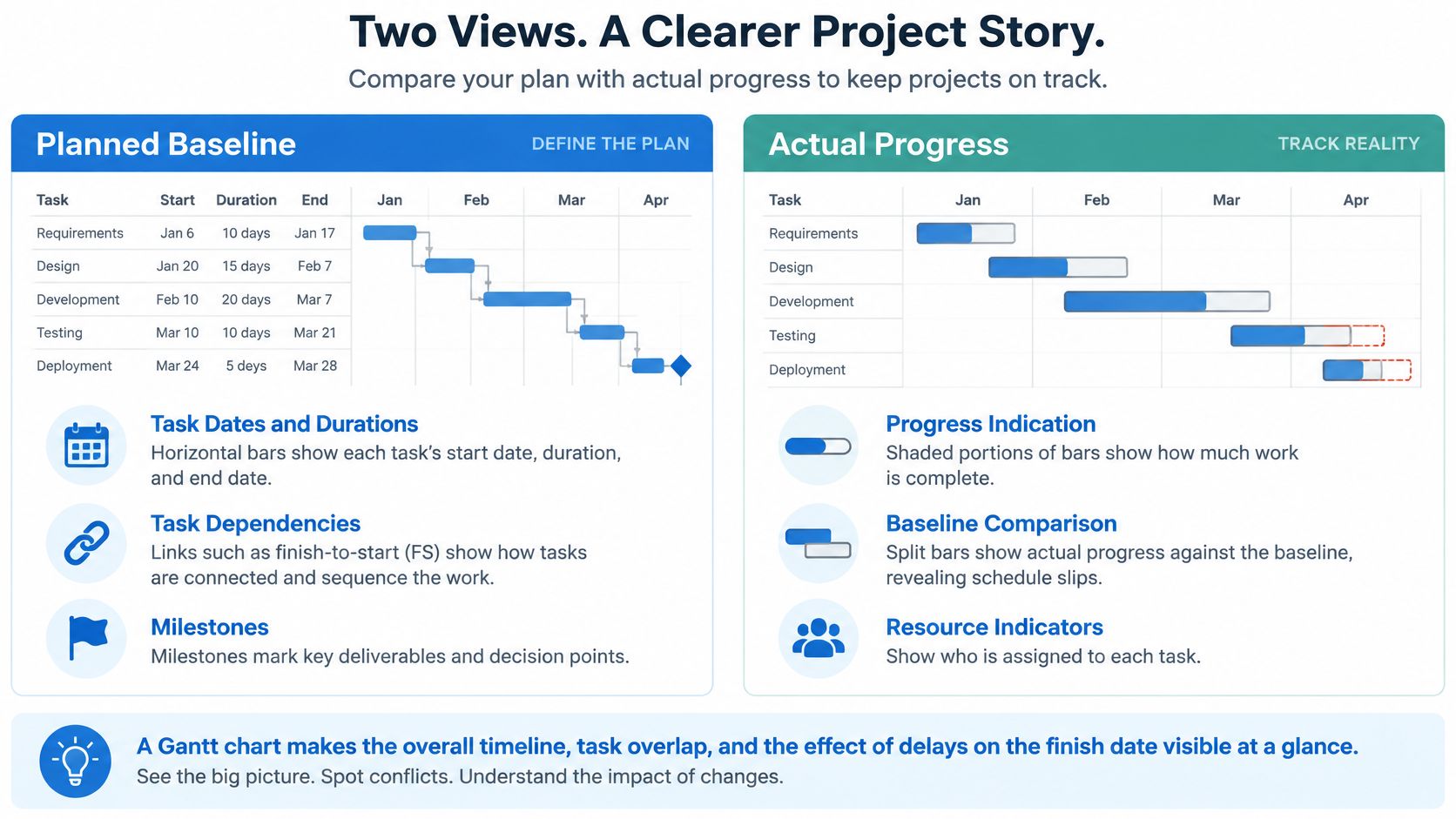
Bars record commitment. They don't record value. PMI's 2024 Pulse of the Profession put the average project performance rate at 73.8%, the share of completed projects that met their business goals (PMI's 2024 Pulse of the Profession report). A bar that fills in on the 30th proves a task closed. It says nothing about whether the client adopted the thing.
Setting One Up So It Survives Week Four
- Start at milestone level. Lay out phases and milestones first, then break them into tasks only where a handoff or dependency needs the detail.
- Baseline on approval. Save the approved version so a slip is measured against a commitment, not against last week's edit.
- Show dependencies, not just dates. A finish-to-start link is the difference between a schedule and a picture of a schedule.
Practical rule: If updating the chart takes longer than the conversation about it, you've drawn too many bars.
Keep the bars next to the chat and the source files. When a date moves, the reason should be findable inside the same project, not in a thread someone archived.
2. Work Breakdown Structure (WBS)
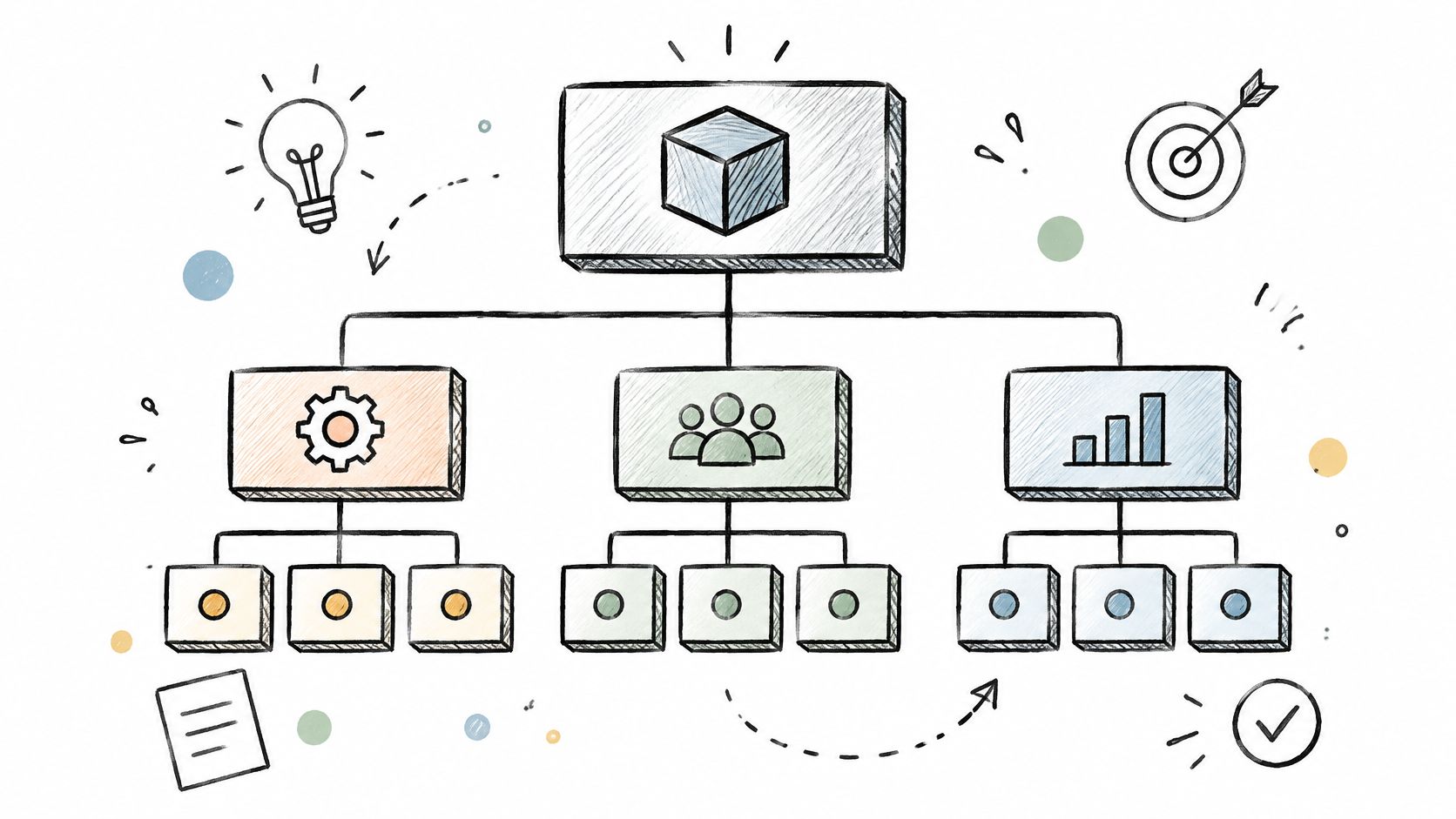
A WBS decomposes total scope into deliverables, then into work packages, until each piece is small enough to estimate and hand to one owner. It carries no dates at all, which is the point: scope first, sequence later.
That separation matters more than is often admitted. In PMI's 2024 global study of more than 10,000 project professionals, respondents rated 48% of projects clearly successful, 40% mixed, and 12% failures, producing a Global Net Project Success Score of 36 (PMI's 2024 project success report). The mixed band is where scope drift hides: outputs delivered, benefits missed.
A WBS reads as a tree, not a timeline.
Applying the 100% Rule
Each level must contain all the work of the level above it and nothing extra. Event planning splits into venue, catering, speakers, and marketing. A product launch splits into hardware, software, documentation, and support. A studio job splits into concept, assets, revisions, and final delivery.
- Package size: if you can't estimate it in one sitting, it's still a deliverable, not a work package.
- One owner each: two names on a package means nobody owns it.
- Traceability: map every package to a task so the scope tree and daily execution never drift apart.
When scope has to turn into phases, owners, and approval gates, the project implementation plan structure picks up exactly where the WBS stops.
3. Kanban Board Project Plan
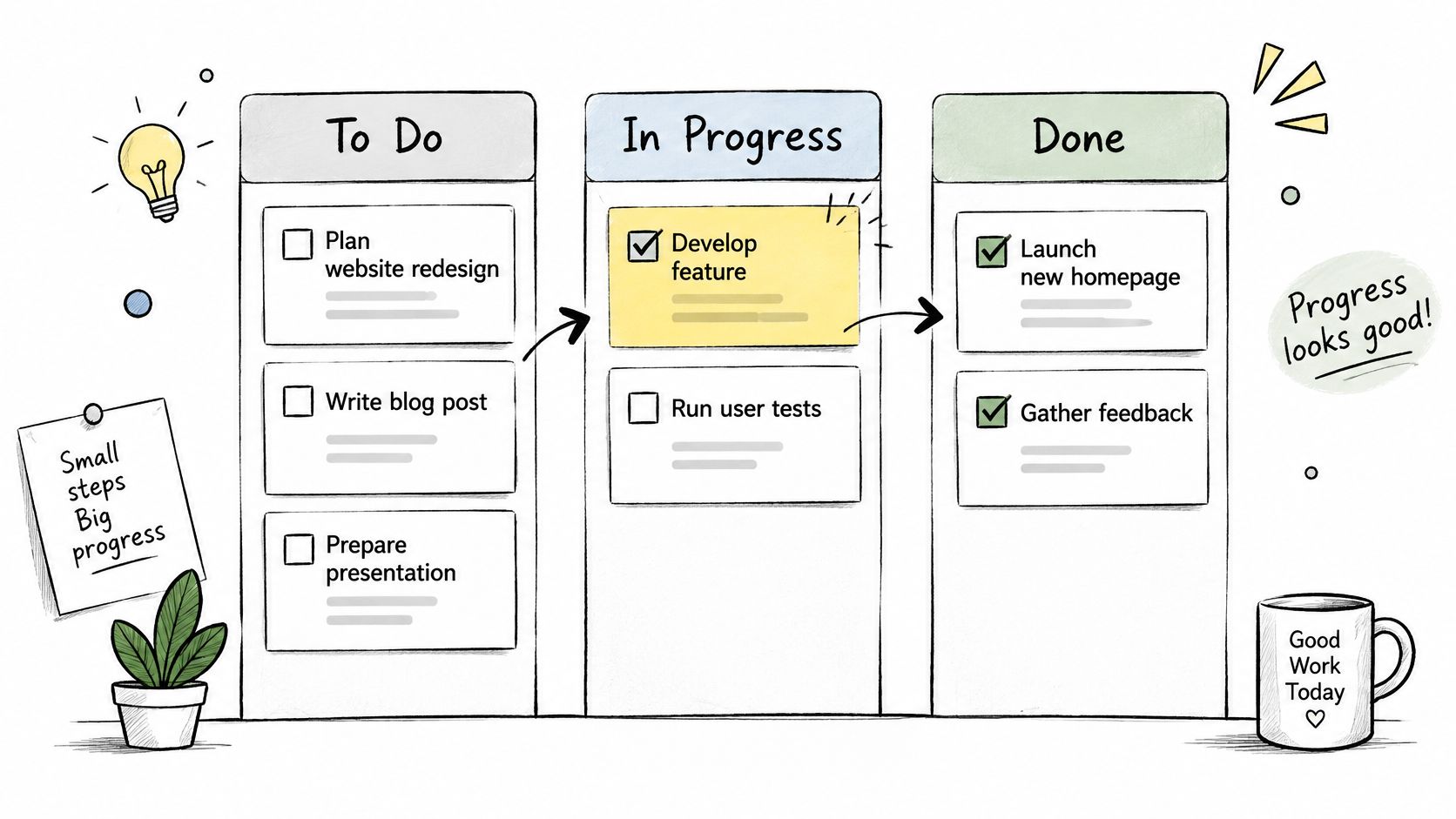
Kanban plans work as cards crossing columns such as To Do, In Progress, Review, and Done. It came out of Toyota's production system and suits work that arrives continuously: design requests, support tickets, a content pipeline that never really ends.
The format's real strength is that a card can carry structure. A contractor profiled by McKinsey replaced anecdotal site-to-supplier defect feedback with a mobile workflow that tagged defects to specific elements in the building-information model and stored the records in a common data environment. Suppliers ran root-cause analysis at the factory and fed fixes back into production, and the reported result was a 12% reduction in job-site rework hours (McKinsey's analysis of digital transformation in construction).
That gain came from making a card a record, not a sticky note. Here's the board shape to copy.
Columns Need Exit Criteria
"Done" is not a feeling. Define what a card must hold before it moves: location, asset, severity, owner, evidence, and a due date.
- WIP limits: cap the In Progress column so people finish before they start. A pile of half-done cards hides every bottleneck you're trying to find.
- Entry criteria: a request without a named requester and a stated outcome doesn't enter the board.
- Blocker capture: when a card stalls, the blocker becomes its own card with an owner and a decision date.
Running several client boards at once? The guide to managing multiple projects covers how to keep flow visible without merging everything into one overwhelming wall.
4. Scrum Sprint Plan
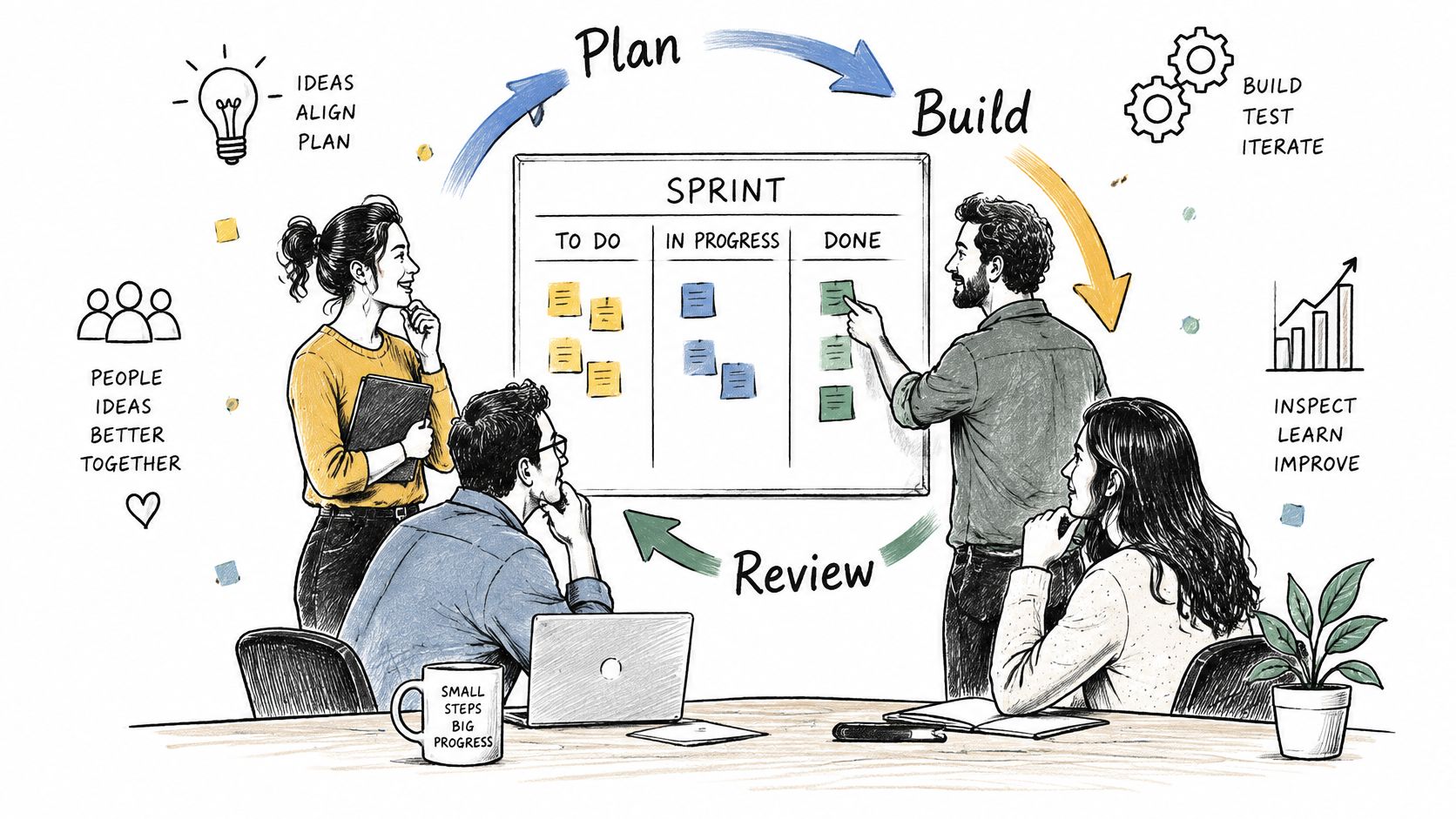
A sprint plan trades scope certainty for cadence certainty. Work is fixed for one to four weeks against a sprint goal, drawn from a prioritized backlog, reviewed at the end, and adjusted in the next planning session. Software teams shipping features every two weeks live here, and so do agencies running a website redesign with a client review at each cycle.
The format usually fails for one reason: the plan gets made in the room and disappears when the room empties. Zoom's 2024 collaboration survey, conducted by Morning Consult with 7,969 full-time knowledge workers across 16 countries, examined how teams coordinate day to day (Zoom's collaboration report), and sprints are coordination instruments before they are scheduling ones.
The visible half of the plan looks like this.
Protect the Goal, Not the List
A sprint goal that reads "finish the backlog" isn't a goal, it's a wish. Write it as one sentence the client would recognize as progress.
- One target per cycle: the team, the stakeholder, and the review notes all point at the same sentence.
- Change control mid-cycle: new requests go to the backlog unless the goal itself is at risk, and the person who asked gets told which happened.
- Standups stay short: move every "how do we fix this" question to the task thread, where it leaves a record.
Fifteen minutes of standup beats an hour of status meeting, but only when the blockers raised actually land as tasks with names attached.
Reporting sprint outcomes to clients who never sit in the room is its own skill, and the project manager reports approach keeps those updates tied to evidence rather than optimism.
5. Critical Path Method (CPM) Project Plan
CPM maps tasks as a network, finds the longest chain of dependent tasks, and treats that chain as the project's minimum duration. Tasks on the path have zero float, so a day lost there is a day lost on the end date. Everything else can move a little without hurting the finish.
The method was developed in the late 1950s for complex engineering programs and still runs plant shutdowns, construction sequences, and software migrations built around a fixed cutover date.
A short walkthrough of how the network is built and read:
Float Is the Point
Uncertainty isn't the same thing as risk. A risk can be described and assigned a response. Uncertainty needs staged discovery before anyone commits to a date. PMI reports that 97% of project professionals managed at least one complex project in the previous year, and leaders estimated 13.7% of construction value was lost to uncertainty in 2025, about $2.5 trillion globally (PMI's Pulse of the Profession on complexity).
- Review the path weekly. It shifts as tasks finish early or late, and a stale critical path gives false comfort.
- Watch low float, not just zero float. A task with two days of slack on a six-week project is a task that will hurt.
- Record dependencies as task links. A dependency that lives in someone's memory disappears when they take leave.
Put confidence ranges on the near-critical tasks rather than single dates, and set the decision point where a slip on the path forces a scope conversation.
6. PRINCE2 Project Plan
PRINCE2 organizes a project around principles, themes, and processes: a project board, a project manager, defined stages, tolerances, and documented decision points. Its project plan covers approach, stages, quality, risk, and communication. Government IT programs in the United Kingdom and large corporate transformations use it because auditors want evidence of control, not a nice bar chart.
The overhead is real, and it buys something specific. An American tunnel project with nearly 600 vendors moved bidding, tendering, and contract management onto a single platform. Compared with the fragmented workflow it replaced, the platform saved more than 20 staff hours per week, cut report-generation time by 75%, and accelerated document transmittals by 90% (McKinsey on imagining construction's digital future).
At that scale, coordination economics dominate everything else in the plan.
Tailor It or Drown in Templates
A three-month internal project doesn't need every product in the method.
- Cut to size: keep stage boundaries, tolerances, and the decision log, and drop the artifacts nobody reads.
- Set tolerances early: the team needs to know the threshold that triggers escalation before a problem becomes a surprise.
- Keep the decision log searchable: stage reports and approvals belong with the plan, not in an email folder.
Files, versions, permissions, and approval status matter more than automation in this format. Get shared metadata and auditability right before adding anything clever.
7. One-Page Project Plan
A one-pager compresses a project onto a single page: objective, scope, deliverables, milestones, owners, risks, and success measures. Small teams, client kickoffs, and approval meetings run on it because nobody reads twelve pages before a decision.
The weak spot is the finish line. University of Sydney guidance separates outcomes, the findings or results you're after, from outputs such as publications, tools, datasets, or websites, and insists on a logical path from aims through methods to both (University of Sydney research project plan guidance). Most delivery plans stop at outputs and call it done.
What Earns Space on the Page
- Benefits statement: one line naming what the client can do afterwards that they couldn't do before.
- Baseline, target, and owner: a metric with a starting value, a target value, and the person accountable for reporting it.
- Acceptance criteria: who signs off, and on what evidence. "Client happy" is not evidence.
- Review date: a real date after launch when someone checks whether the benefit landed.
The most useful line on any example project plan is the one that says who decides the project succeeded.
Pin the page as the first document inside the project so every new person reads the same version instead of reconstructing scope from chat.
8. Product Roadmap Project Plan
A roadmap sequences themes and outcomes across quarters. It's deliberately less precise than a schedule: rough horizons, priorities, and the reasoning behind them, with room to change as you learn. Software companies publishing quarterly feature roadmaps, agencies running multi-quarter client programs, and studios mapping campaign phases all work from one.
The cost of getting this wrong shows up in payroll. In 2024, Zoom and Morning Consult estimated inefficient collaboration cost organizations up to $16,491 per manager annually in lost productivity (Zoom's workplace collaboration report). A roadmap that lives in a slide deck nobody annotates, disconnected from the tasks it implies, produces exactly that drag.
Dates as Ranges, Decisions as Records
A roadmap is the only format on this list where vagueness is a feature, which is why it needs discipline everywhere else.
- Label horizons as targets: "Q3" or "second half" rather than a day, so nobody treats a guess as a commitment.
- Link every item to a detailed plan: a roadmap item with no tasks behind it is a wish with a quarter attached.
- Announce changes where people work: a reprioritization that only exists in a leadership thread reaches the team three weeks late.
Of the five elements, the roadmap carries goals strongly, handles timelines loosely, and usually skips owners and tasks entirely. Pair it with a Kanban board or a sprint plan so the strategy has somewhere to land.
How the eight example project plan formats compare
| Item | Core Focus | Timeline Style | Best For | Governance Level |
|---|---|---|---|---|
| Gantt Chart Project Plan | Task schedules and dependencies | Calendar-based bars with dates and milestones | Schedule-driven projects | Moderate |
| Work Breakdown Structure (WBS) | Scope and deliverables | No timeline; hierarchical structure | Defining and estimating project work | Moderate |
| Kanban Board Project Plan | Continuous workflow and work in progress | Flexible flow across stages | Ongoing work and changing priorities | Lightweight |
| Scrum Sprint Plan | Incremental delivery and sprint goals | Fixed-length iterations | Teams adapting work through regular feedback | Moderate |
| Critical Path Method (CPM) Project Plan | Dependencies and tasks that determine project duration | Network-based schedule with critical path | Complex, tightly sequenced projects | High |
| PRINCE2 Project Plan | Structured project control and accountability | Staged plans with decision gates | Large or formally controlled projects | High |
| One-Page Project Plan | Essential goals, deliverables, owners, and risks | Condensed milestones and key dates | Small projects and quick stakeholder alignment | Lightweight |
| Product Roadmap Project Plan | Strategic priorities and outcomes | Broad time horizons or target ranges | Communicating product direction and priorities | Moderate |
Choose the Plan Your Team Will Keep Current
Pick the format around the element most likely to fail. A plan earns trust when the same five elements stay visible as work changes: goals, deliverables, timelines, owners, and tasks. If one of them goes stale, the rest start lying too.
Match the format to the risk:
- Timeline and sequence are the risk. Use a Gantt chart, and add critical path analysis when one chain of tasks decides the end date.
- Scope is the risk. Build a WBS before anyone estimates a date.
- Work arrives continuously. Run a Kanban board with WIP limits and exit criteria.
- Requirements change every few weeks. Plan in sprints with a stated goal per cycle.
- Approvals and audit trails decide whether the project survives review. Use PRINCE2, scaled down.
- A client needs to agree on scope in one meeting. Use one page.
- Direction across quarters matters more than this month's tasks. Use a roadmap.
Real projects often need two formats. An agency can show the client a one-pager while production runs the board. A construction firm can hold a WBS for scope and a CPM network for schedule. The split works when each format has a job and one shared source underneath it.
That shared source matters more than the template. If goals sit in a deck, deliverables in a spreadsheet, owners in a chat thread, and tasks in a tool, every update becomes reconciliation by memory. Keep the five elements in one workspace so a changed date, owner, or deliverable lands where the work is already tracked. Tuff keeps a project's tasks, chat, docs, and announcements together, so the plan and the conversation that changes it stay in the same place.
Then protect the update. Give one person accountability for reconciling plan and reality. Set a recurring review, keep it short, and record a date change the day it happens. When a task moves lists, the status moves with it; when a decision affects everyone, make it an announcement instead of burying it in chat. My Tasks shows each person what is assigned to them across every project, soonest first, and several tasks can be selected with X when a scope change means dates, labels, or sprints have to move together.
Plans rarely fail at kickoff. They drift when the document says one thing and the board says another. A plan format only earns its keep when the plan stays where the work happens. Tuff puts projects, tasks, chat, documents, and time tracking in one workspace on a flat subscription rather than a per-seat fee. If you are rebuilding a plan that drifted, start a Tuff project; five empty lists are ready for tasks.